Sunday, May 27, 2018

Electroneum (ETN) referral code - 24D744

While most of you were mining Electroneum (ETN) on mobile app, you can boost up your earnings by using referral code. You can not use your code (obviously) or you need another account from which you can use referral code. Either ways, your first account will be left without referral code.

You can use below referral code for your first account. It should give your mining account a little boost.

Referral code is - 24D744

Alternatively, you can scan the QR code from below image.

Friday, April 20, 2018

Sending pfx or p12 certificate using javascript


Recently I was stuck with a task where I needed to send .p12 file along with the request and since this certificate is different from the regular one, it will have to be sent in a different way.

The testing framework was in Javascript and we used chakram as the module to send the request which is using requests module underneath. It took some time to find out a working solution which I am sharing here. Hope this will help you.

Code
 var fs = require('fs');  
 var options = {  
   headers: { 'authrization':'' },  
   agentOptions: {  
     pfx: fs.readFileSync('certfile.p12'),  
     passphrase: 'passphrase',  
     securityOptions: 'SSL_OP_NO_SSLv3'  
   }  
 };  

Wednesday, August 23, 2017

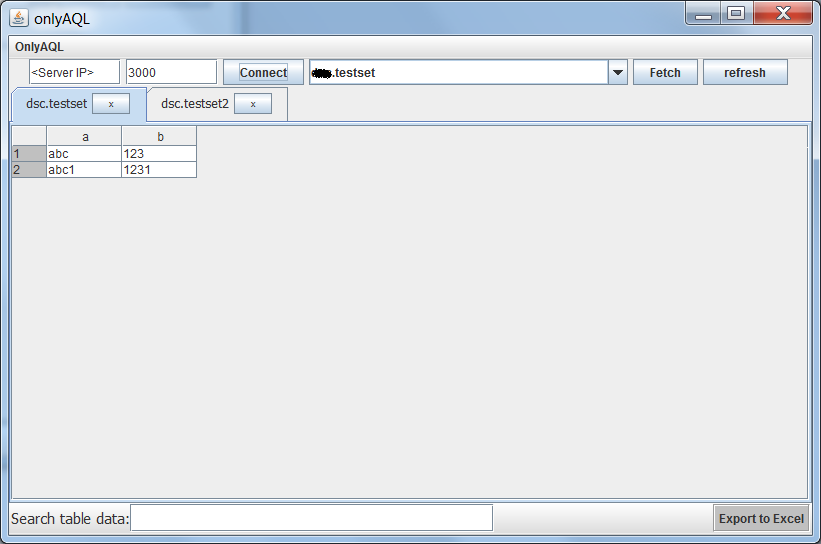
OnlyAQL - Aerospike GUI client

Right now it can only fetch records from Aerospike but we are continuously working on the improvement of this tool and will add other features also.


you can download it from : https://drive.google.com/file/d/0BylEbVLsc5L8OFB2eGNLWFFLQ0E/view?usp=sharing&resourcekey=0-UbNqAlEdmJbNr-j5FjIoHQ


Git hub link to project code: https://github.com/jain-neeeraj/OnlyAQL


Saturday, December 3, 2016

Storage in ServiceWroker while site is not running


Few days back while working with service workers I got caught with a unique kind of problem. I wanted to show notification data to the users in a dropdown and the tricky part was the notifications sent  while site was not open in any tab. I was not able to store that information as service worker cant directly use DOM. As site was not open in any tab, it couldn't post it to the site JS which could have inserted it to localstorage.

Fortunately, I was able to solve the problem. As a workaround I tried a very tricky implementation. It was based on the fact that ServiceWorker specifications said it can not access DOM and it cannot store values in browser storage but it did not said anything about the global variables. So, I stored the values in global Variable just by declaring an array outside of all the methods.

var notificationList = new Array();

Parsed information of notification is then pushed to this list from the Event Listner where serviceworker is listening to push event.

notificationList.unshift(parsedNotificationData); 

Now this notification information is available and stored inside the serviceworker which webpage JS can ask for on load.

Hope this was a bit helpful.